
 1:25
1:25
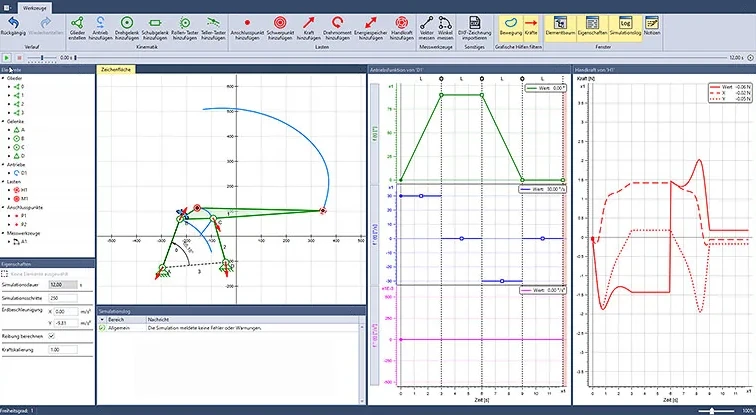
Four-bar linkage with manual force
The manual force element shows in real time how the required manual force changes when you move the application point, a bearing or the center of gravity.
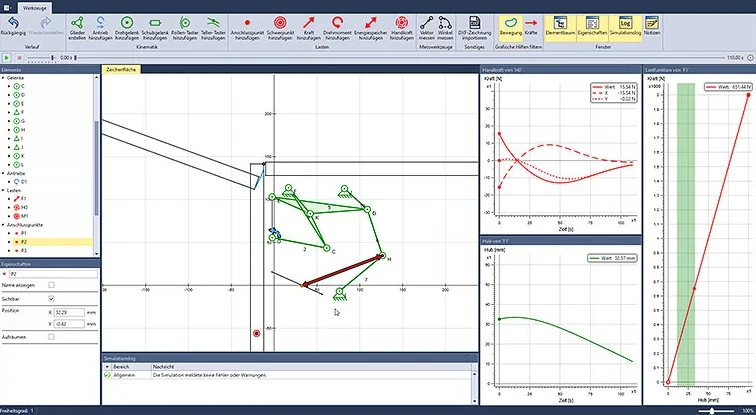
Tension springs support a kitchen cabinet flap with a six-bar hinge. The example shows how you set the springs in ASOMmini for different flap weights.
 2:41
2:41
The flap opens by 110° and is supported on both sides by tension springs with adjustable attachment points. The manual force curve has to suit flap weights from 2 to 8 kg: at first, force is needed to open the flap, and from an opening angle of about 15–20°, the flap opens by itself all the way.
You see the manual force curve over the entire opening movement and can tell exactly from which angle the flap opens by itself.
You find the right attachment point in the model, not by rehooking the springs on the prototype. More on force calculation
You can see which attachment points you need to provide for light and heavy flaps.
The cabinet and flap enter the model as DXF drawings, and parts of them move along – the design is immediately easy to understand.
1:25
The manual force element shows in real time how the required manual force changes when you move the application point, a bearing or the center of gravity.
 2:26
2:26
How much force is needed at the handle or directly at the door? The inner workings of the door closer are captured in a programmable torque, so the model stays lean.
 3:57
3:57
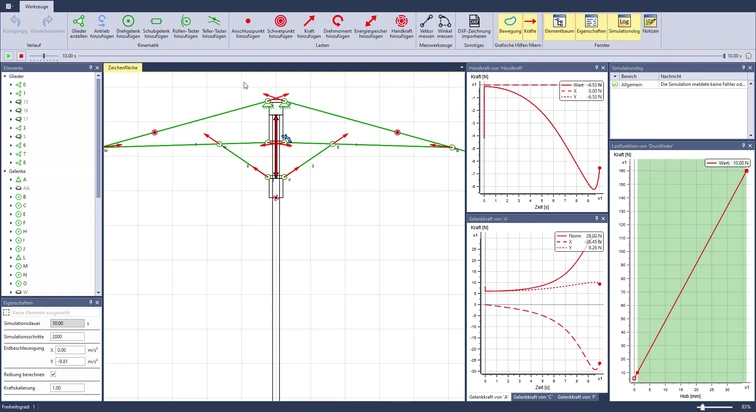
A pressure spring between the sliders opens the umbrella by itself. ASOMmini shows manual force and joint forces in real time, even with a modified spring characteristic curve.
Describe your mechanism to us. In an online demo, we will show you ASOMmini using your example.